Case Study
Fintech Onboarding Reduced Support Tickets by 43%
Correcting users' mental model of what the system was capable of through a discovery survey, product tour, and email sequence.
Role
Product Designer
Company
Boosted.ai
Collaborated with
PMs, Eng, Customer Support
Impact at a Glance
0%
Activation rate
↑ from 34%
0%
Faster time to value
reducing the time to create an active AI financial agent
−0%
Support tickets
after launch
0%
Users who understood the AI "analyst" concept
↑ from 15%
The Problem
There was no onboarding.
New users entered the product after a credentials handoff from the CS team and were expected to self-navigate a sophisticated AI platform. The result was predictable.
Users didn't know what they had access to
The platform's depth — custom analysts, notification layers, template libraries, agentic features — was invisible without a guide.
The core concept confused people
Many users treated the AI analyst as a chatbot. Miscategorization led to poor usage patterns and early frustration.
The product required human onboarding
New users depended on Customer Support to understand how the platform worked. A self-serve path didn't exist (free financial chat with limited credits → upgrade to agents/analysts).
Every question reached CS
No help center, no in-product documentation. Every knowledge gap became a support ticket.
Constraints
What we were working around.
"Solutions had to be high-leverage, low-lift, and adaptable to a CS-mediated account flow."
Research ·
I talked to CS to understand how users actually got onboarded.
There was no documented onboarding process. Different CS members ran different flows depending on client type. I mapped both to find the gaps.
Info from Sales
pain points · metrics · success definition · universe
2–3 sessions
library → do 1 together → worklog → settings
CS shows features
direct · idea gen · Alfa in contract
Homework
set ISM · upload portfolio
Bi-weekly calls
at first, then every 2 months

FigJam session with 5 members of the Customer Support team.
Users will be arriving through 4 additional doors.
There was a business decision to start a PLG growth strategy and add more ways how prospects can join the product, not just through the Sales → CS route. So I met with the CPO and one more designer at the office to map every path a user could take to reach the platform for the first time.
ENTRY POINT 1
From the website
Users discovered Alfa through the website and signed up cold — no CS involvement, no pre-populated context. The highest-risk path for drop-off.
ENTRY POINT 2
reads a post → clicks link to an agent report → views report and adds it to workspace → signs up → receives a magic link → lands in the product
ENTRY POINT 3
Call Alfa
calls Alfa → has a conversation → Alfa asks follow-up questions to understand their needs → receives a text when the report is ready → views report and adds it to workspace → signs up → receives a magic link → lands in the product
ENTRY POINT 4
Email Alfa
emails Alfa → has a conversation → Alfa asks follow-up questions → receives an email when the report is ready → views report and adds it to workspace → signs up → receives a magic link → lands in the product

Whiteboarding onboarding new entry points with the Product team in Toronto
Key Insights
What we learned before designing anything.
Users didn't have a mental model for what they were doing
The terminology assumed familiarity with AI tooling. Portfolio managers are domain experts — not AI practitioners. Onboarding needed to transfer a mental model before it could teach a workflow.
Activation depended on one specific moment
Users who completed their first analyst run in session one were dramatically more likely to return. Everything else in onboarding existed in service of that one moment.
Support tickets were a proxy for missing self-serve infrastructure
CS was fielding high volumes of repetitive questions. Every question that reached CS represented a self-serve failure — not a CS failure.
The Deeper Problem ·
Users didn't know they were building automations.
USER PROBLEM
"As a user, I'm used to chat-based LLMs that give me one static output. I'm unaware that I can convert my investment processes into autonomous workflows — and I greatly underestimate the platform's abilities."
DESIGN CHALLENGE
Make it painfully obvious — through onboarding, the home page, and the chat interface — that Boosted.ai is not a Q&A tool. It converts investment workflows into autonomous sequences of tasks. Users are notified when criteria are met. The experience must center on creating and monitoring agents, not chatting.
KEY REFRAME
The product needed to stop presenting itself as a smarter chat tool and start presenting itself as a workflow automation layer — with LLM as the engine, not the interface.
SOLUTIONS
Four solutions, one goal
Four solution components, one goal: get users to their first agent run without CS involvement. Survey personalizes the environment. Tour and emails activate the user within it.
01
Onboarding Survey
A 7-step questionnaire that personalizes the platform before the user sees a single agent. Every answer does real work.
02
Personalized Templates
Customized based on the answers provided during onboarding — showing users the platform isn't just a place to chat, but to create agents that do ongoing work.
03
Onboarding Emails
Instead of one credentials email, a 3-part sequence that nudges users to open the app and shows them how to get value from their first session.
04
Stonly Tour + Help Center
A compressed, value-first product tour — activated on page load or via the "?" icon. Help Center answers the highest-frequency CS questions. PLG-ready.
01. Onboarding Survey: 7 questions to understand the user.
The idea was to ask the same questions CS uses to determine which agents to suggest to a new user, and use those answers to personalize their platform environment before they ever see an empty screen.
📑
Suggests templates
Answers map to a "Suggested for you" tab in the template library, surfacing agents that match this user's actual workflows.
🤖
Personalizes agents
Selected goals auto-configure agent parameters. First run is already relevant.
🧠
Updates platform memory
Responses feed the user model, making AI responses more accurate and context-aware over time.
Name and role
Captures who the user is — PM, analyst, or other. Sets the context for all subsequent personalization.
→ Personalizes language and default agent suggestions to the user's role.
What's your main goal in Alfa?
User selects from use cases mapped to automations where Alfa produces strong outputs.
Use cases sourced from time-saved benchmarks: Thesis Validation ~108 hrs/quarter per analyst. Competitor Analysis ~72 hrs.
→ Determines which agent templates appear in "Suggested for you."
Do you have a preferred investable universe?
Geography, asset class, market cap range.
→ Pre-filters agent universe parameters. Agents won't suggest APAC stocks to a US-only PM.
What sectors do you prefer?
Multi-select sector preferences.
→ Pre-populates sector filters in templates.
Upload your portfolio (optional)
Enables portfolio-aware agents. Templates like "Analyze a Portfolio" work immediately with real holdings.
→ Agents run against actual positions and flag relevant risks.
Upload your investment style doc (optional)
Investment policy statement or mandate. Alfa reads risk appetite and preferred framing.
→ Future AI responses align with stated constraints — not generic analysis.
Let us learn your workflow
Free-form: "Tell us what you want to automate." Alfa suggests templates based on the response.
This step reframes the entire onboarding. Instead of "here's what the product does," the question is "here's what you do — let us build it for you."
→ Most personalized template suggestions. Seeds platform memory with the user's stated workflows.
Invite your team (optional)
Shared agents and coordinated workflows from day one.
→ Shared agent library. Reduces redundant setup across the team.
We created a prototype to test with users and present to CS and engineering — to validate whether these 8 questions were enough to meaningfully personalize a user's account on first login.
↗ Open full prototype02. Personalized Templates
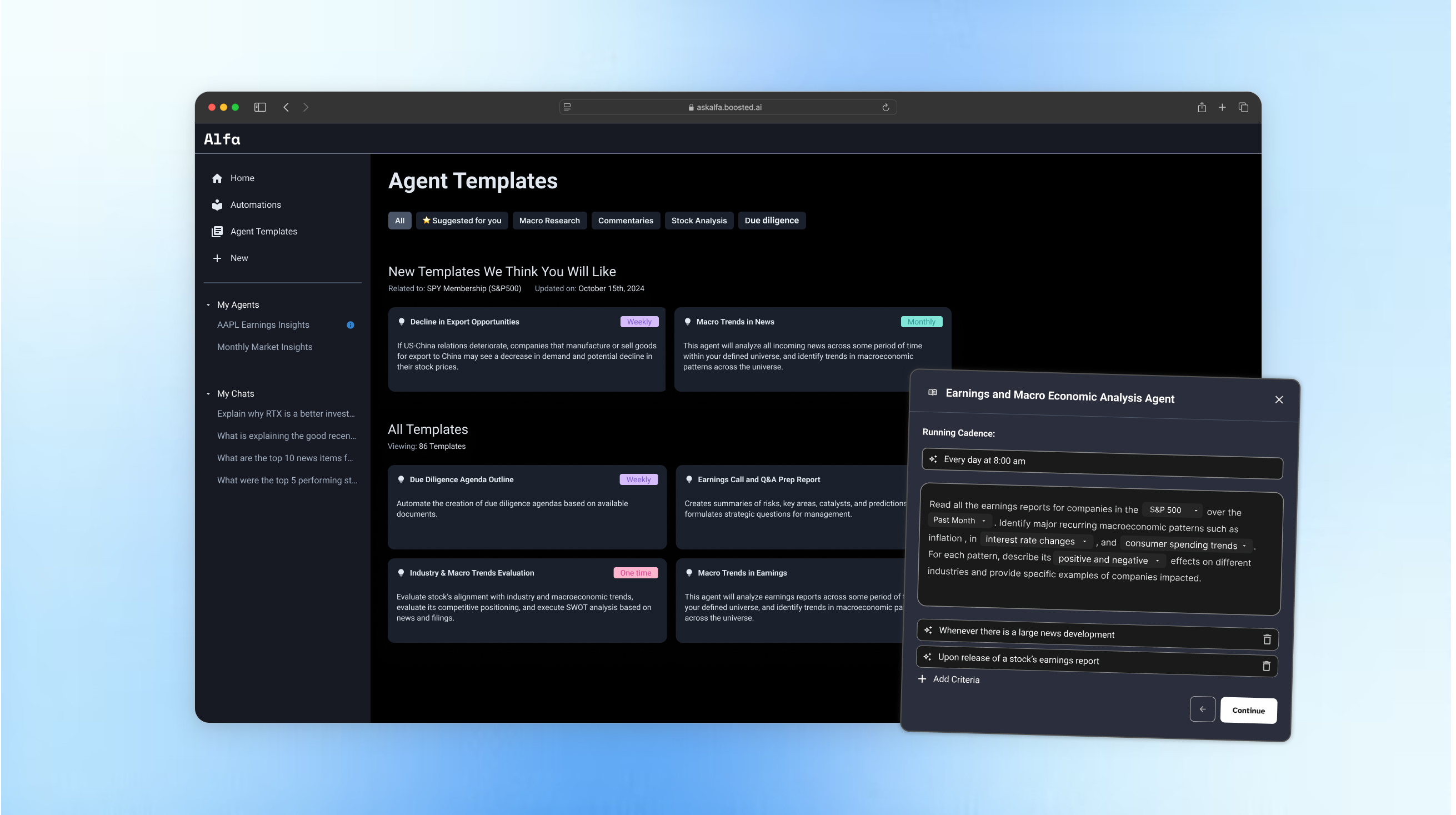
Once the user lands in the platform, they see a "Suggested for you" tab populated by their survey answers. They can see the structure of the prompt immediately — no blank screen, no guessing. The power is that the template makes it obvious they're building an agent, not sending a chat message.

"Suggested for you" tab on Analysts Library: templates pre-selected based on user's stated preferences during onboarding.

Template expanded: user sees the prompt structure, not a blank input.
03. Onboarding Emails
Instead of a single credentials email, we built a 3-part sequence with one goal: get the user to create at least one good agent. Each email has a single CTA and builds on the previous one.
Email funnel — From blast to narrative
Initial approach was a single welcome email with a product link. Engagement was negligible. Restructured into a 4-email narrative arc timed to account creation. Each email had one CTA. The sequence created a parallel activation path — reaching users between sessions, when the product itself couldn't.
Parallel activation path for non-CS accountsWelcome email
Introduces the platform and sets expectations. CTA: complete the onboarding survey to personalize your account.
Optimizing & activating your first agent
Shows the user what a well-configured agent looks like and walks them through running their first one. CTA: run your first agent now.
Build a good agent from scratch + settings
For users who haven't activated yet. Explains how to build an agent from a blank state and points to key settings. CTA: build your first agent.

3-email onboarding sequence with a goal to have at least one good agent created per user.
04. Stonly Tour + Help Center
The tour activates when a user opens a key page or clicks the "?" icon — short, contextual, non-distracting. The Help Center runs alongside it as a permanent self-serve layer, built around the highest-frequency CS questions.
Contextual Stonly Tour
Instead of a mandatory onboarding sequence with 15 repetitive "Next" clicks, we made help contextual, concise, and unobtrusive.

Help Center
Articles structured around the most frequent CS questions — searchable, always available, no CS ticket required.

WHAT WE DIDN'T SHIP ·
Two ideas we explored but set aside.
Both concepts showed real promise for personalization, but required infrastructure and integrations that were out of scope for this phase. We documented them for future consideration.
CS & Fathom input
During onboarding calls, the CS team uses Fathom to record and summarize client conversations. This concept explored feeding those summaries — user preferences, portfolio context, use cases — directly into the platform to pre-populate personalized analysts before the user ever logs in.
STEP 1
CS discovery call
Fathom captures user preferences and automation needs in real time.
STEP 2A
Fathom integration
Fathom pushes structured data directly via API integration.
STEP 2B
CS manually creates analysts
CS uses the Fathom summary to manually build the first analysts.
STEP 3
User signs up
User creates their Alfa account.
STEP 4
3 pre-populated analysts
User lands in a product that already knows them. Personalized from day one.
TRADE-OFF
High personalization, but dependent on CS effort and Fathom data quality. Doesn't scale without the integration path.

Fig. 3 — CS team uses Fathom call summaries to pre-populate personalized analysts before user login.
EXAMPLE SCREENS
Step 1 — Fathom call summary

Step 2 — Pre-populated Alfa dashboard

Alfie sits on the call
A more ambitious concept: instead of relying on CS to transfer knowledge, what if the AI itself attended the onboarding Zoom call? Alfie would passively listen, extract portfolio preferences and automation needs in real time, and use those signals to pre-configure the user's first analysts automatically.
STEP 1
Sales / CS discovery call
While the client talks to Sales/CS, Alfie listens and captures preferences and automation needs.
STEP 2
User signs up
User creates their Alfa account.
STEP 3
We show what we learned
Platform surfaces what Alfie understood. User reviews and can modify.
STEP 4
3 pre-populated analysts
Alfie's memory is already working.
TRADE-OFF
Maximum automation and personalization. Requires Zoom API integration, real-time ML inference during calls, and strong user trust. Future-state — not shipped.

Fig. 5 — Alfie attends the onboarding call, listens in real time, and pre-populates analysts on signup.
Alfie on Zoom
Required Zoom API integration and real-time ML inference. The trust and infrastructure dependencies made it future-state. The concept validated the direction: personalization before signup dramatically improves activation.
Fathom + CS pre-population
The manual CS path (Step 2B) was implemented. The Fathom integration path remains in the backlog. Even the manual version showed meaningful improvement in same-session activation for CS-supported accounts.
Iterations
What changed, and why.
Comprehensive walkthrough
9-step tour covering the full product surface: login, notifications, analyst creation, templates, export, settings. Drop-off was severe and consistent. Users bounced at steps requiring decision-making — the tour front-loaded effort before establishing value.
68% drop-off at notifications stepValue-first sequencing
Restructured to lead with a demonstration of finished analyst output before asking users to configure anything. Notifications reframed as "set it once, never miss an update" — emphasizing the recurring value, not the setup task. Step count reduced.
Drop-off fell to 41% — directional validationVisual redesign + step compression
Visual hierarchy introduced. Step count compressed to 5 by merging contextually related steps. Visual elements added to make each step feel like a product experience rather than documentation. Tour completion reached 71%. Notifications drop-off fell to 29%.
71% completion rate · 29% drop-off at notificationsWHAT THE DATA TOLD US
Tour improvements moved the numbers, but not enough. The 29% drop-off at notifications wasn't a design problem — it was a comprehension problem. Users didn't know why they were setting up notifications because they didn't understand what the agents would do. We needed to fix the mental model before the first click, not during the tour.
Outcomes
Quantitative
90-day post-launch window vs. prior 90-day baseline. Activation defined as account creation → first analyst run completed.
Qualitative
user quote
"I actually understood what I was supposed to do on day one. That was different."
— Portfolio Manager
user quote
"The email that explained what an analyst was — I read it before logging in. Everything clicked."
— Analyst user
user quote
"Before I felt like I was talking to a chatbot. Now I get that I'm configuring something."
— Ali Nozari
user quote
"I didn't need to ask CS anything. Found everything in the help center."
— User, support survey
user quote
"I actually understood what I was supposed to do on day one. That was different."
— Portfolio Manager
user quote
"The email that explained what an analyst was — I read it before logging in. Everything clicked."
— Analyst user
user quote
"Before I felt like I was talking to a chatbot. Now I get that I'm configuring something."
— Ali Nozari
user quote
"I didn't need to ask CS anything. Found everything in the help center."
— User, support survey
Learnings
What this taught me about AI product design.
The hardest part of designing for AI-powered products is not the interface — it's the concept transfer. Users arrive with existing mental models (chatbot, search engine, spreadsheet) that don't map cleanly onto what an agentic AI system actually does.
Onboarding in this context is less about teaching navigation and more about building a new cognitive framework. That realization shaped every decision in this project: the language in the tour, the structure of the email narrative, the framing of the empty state.
"The interface was secondary. The mental model was primary."
Segment from the start.
Institutional investors and investment advisors follow different activation paths and workflows. Introducing a simple branching entry during onboarding based on role would allow the experience to adapt to their needs early. This type of segmentation improves personalization without adding significant build complexity.
User's mental model is essential.
Designing around their mental model proved to be effective. Adoption improved once the experience aligned with how users naturally think about the product. Exposing system capabilities helped users perceive the platform as an analyst partner rather than just another chatbot.
Activation = first analyst run.
True activation occurred when users successfully ran their first AI agent workflow. Before that moment, most interactions were exploratory and did not translate into sustained usage. The onboarding needed to guide users directly to this first meaningful action.
Personalization improves stickiness.
Users responded strongly to analysts generated specifically for their role and workflow. Seeing the system suggest analyses tailored to their needs created a sense of relevance and discovery. That moment often turned curiosity into continued engagement.
Self-serve > CS dependency.
Improving guidance and product clarity reduced reliance on customer success for setup and early questions. When users could configure and run their first analysis independently, activation increased and support requests dropped. The goal was enabling confident self-serve usage from day one.
Email is a product surface.
Email became a high-leverage activation channel because it reaches users between product sessions. It works as a nudge that brings users back to the platform while reinforcing key product value. Combined with helpful tips and prompts, it extended the product experience beyond the interface itself.